
Gaming laptops
Gaming laptop MUX switch: when is it worth paying for?
Learn what a MUX switch changes, how Advanced Optimus differs, and what to verify if you play on a laptop screen or external monitor.
01
You game on the laptop screen
Compare exact-model tests at your settings. If the laptops are otherwise comparable, favor a direct-GPU mode.
02
You switch between class and gaming
Automatic switching is more convenient than manually changing modes. Check measured battery life separately.
03
You mostly use a desk monitor
Verify which GPU drives the exact port you plan to use before paying for a built-in-screen feature.
The switch changes who drives the screen
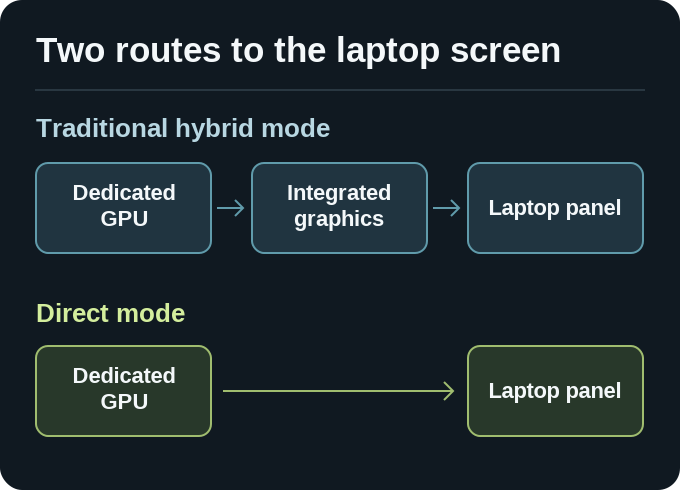
The GPU that renders a game and the GPU that sends the picture to the display do not have to be the same. With traditional NVIDIA Optimus, the dedicated GPU can render the game while integrated graphics still drives the laptop panel. A direct mode lets the dedicated GPU drive that panel itself.
A MUX is the hardware switch in that display path. A manual mode can require a restart. NVIDIA Advanced Optimus uses a dynamic switch on supported systems, so the panel can switch between integrated and dedicated graphics without a reboot. Selecting a high-performance GPU for an app is not, by itself, proof the screen changed paths.
A direct route can improve performance or reduce latency in some games, but there is no reliable percentage to apply to your machine. Compare the same game, resolution, settings and laptop configuration. We did not run FPS, latency or battery tests.
Sources: NVIDIA: Optimus and Advanced Optimus display routing · NVIDIA: verify Advanced Optimus and choose the display mode in NVIDIA app · ASUS: GPU modes on supported ROG and TUF models
Check the screen you actually play on
Built-in screen: direct mode is most worth comparing when a laptop is plugged in and the exact game shows a useful improvement. If your games already run as you like, keep the mode that works. Away from a charger, use the model’s supported hybrid or automatic mode if battery life matters.
External screen: some outputs can connect directly to the dedicated GPU. Others may use integrated graphics. HDMI and USB-C are connector names, not proof of routing. Check the exact manufacturer documentation or look at which GPU the active display appears under in a supported NVIDIA Control Panel setup. Confirm resolution, refresh rate and variable refresh support separately.
Sources: NVIDIA: Optimus and Advanced Optimus display routing · ASUS: GPU modes on supported ROG and TUF models · NVIDIA Help: visualize which display connects to which GPU
Verify the model number before paying more
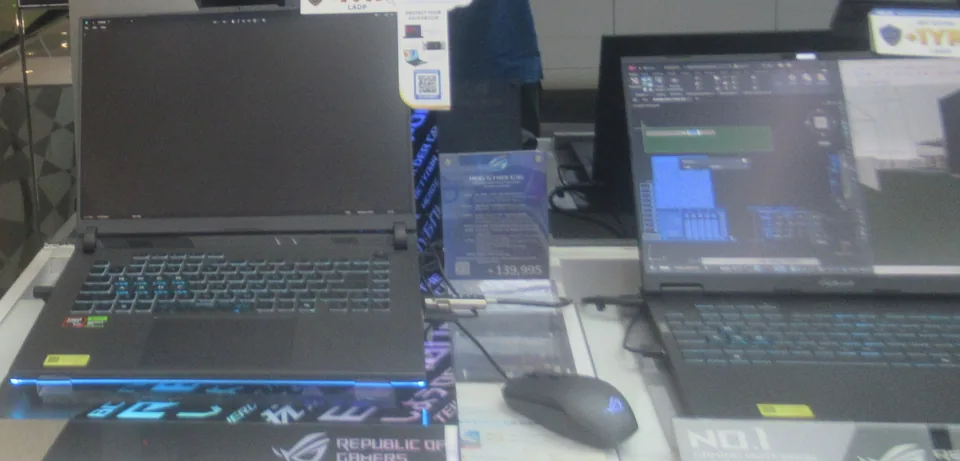
Start with the manufacturer’s specifications for the full model code, not just the retailer’s family name. For example, ASUS lists the U.S. ROG Strix G16 G615LM-MS74 with an RTX 5060 Laptop GPU. That tells you what can render the game, but it does not establish how each external output is wired. Look for separate documentation of the switching mode, panel and ports. This model is an illustration, not a buying recommendation.
If you own the laptop already, NVIDIA documents checking System → My Rig → View Rig Details in the NVIDIA app for Advanced Optimus. On a supported device, System → Displays can show a Display Mode setting. Follow the laptop maker’s guidance if its own app controls the modes.
When comparing two laptops, pay first for the GPU, cooling, memory and screen your games actually need. Use a MUX or automatic switching as a tiebreaker, not a reason to spend more than the rest of the configuration is worth.
Sources: NVIDIA: verify Advanced Optimus and choose the display mode in NVIDIA app · ASUS: GPU modes on supported ROG and TUF models · ASUS U.S.: ROG Strix G16 (2025) exact model specifications
- Write down the exact laptop model and screen or port you use.
- Check whether the maker documents a manual MUX, Advanced Optimus or neither.
- On a laptop you own, compare the same scene on AC power with the same settings and power profile before deciding whether direct mode is worth using.
Common buying questions
Is having a dedicated GPU the same as having a MUX switch?
No. The dedicated GPU can render a game even when integrated graphics still drives the laptop display.
Does Advanced Optimus mean I have to reboot every time?
No. On a supported system, Advanced Optimus can switch the built-in screen’s graphics path automatically. A separate manual setting in a laptop maker’s utility may work differently.
Does a MUX switch improve every external monitor setup?
No. Verify which GPU drives the port you actually use. If it already connects directly to the dedicated GPU, a feature that switches the built-in panel may not help that monitor.
Sources & how we reached our advice
Checked November 21, 2026. We used the primary documentation below for compatibility and specifications. Buying thresholds and decisions are our editorial judgment. This guide does not claim hands-on benchmarks, an exhaustive product ranking, or a test score.
- NVIDIA: Optimus and Advanced Optimus display routing
- NVIDIA: verify Advanced Optimus and choose the display mode in NVIDIA app
- ASUS: GPU modes on supported ROG and TUF models
- ASUS U.S.: ROG Strix G16 (2025) exact model specifications
- NVIDIA Help: visualize which display connects to which GPU
No affiliate links. Editorial standards · Send a correction