
Available this week
A new desktop does not need to be the biggest desktop.
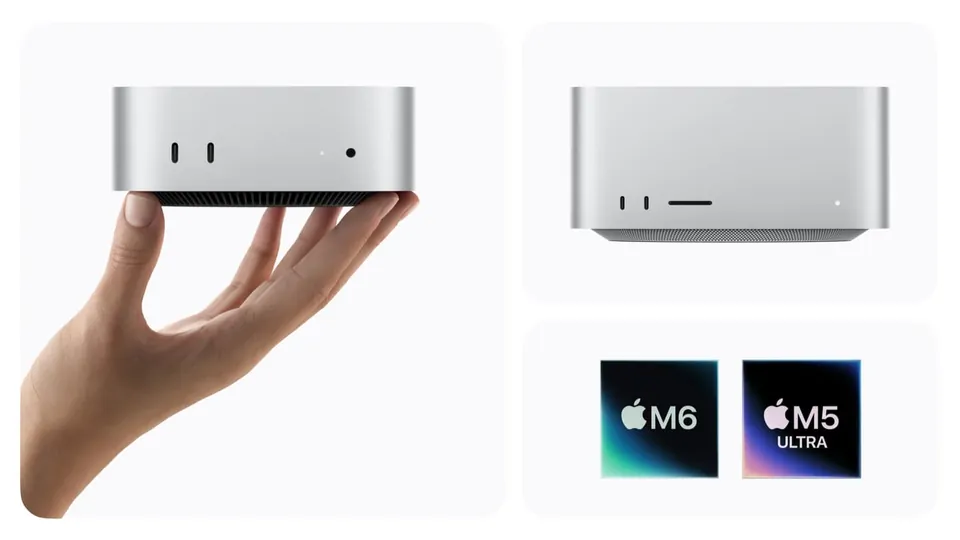
Apple's refreshed Mac mini and Mac Studio became available on September 22, 2026. The mini offers M6 and M5 Pro configurations, while the Studio offers M5 Max and M5 Ultra. For an everyday buyer, our starting question is whether the $899 M6 mini meets the need before spending more. Apple's availability announcement.
This is our initial buying analysis, not a performance review. We have not benchmarked these desktops. The sensible purchase depends on your software, the configuration you choose, and what you already have on your desk.
The price ladder
Every step needs a reason.
Swipe across the table to compare →
| Desktop | Starts at | Our buying lens |
|---|---|---|
| Mac mini · M6 | $899 | First configuration to evaluate for an everyday Mac desk. |
| Mac mini · M5 Pro | $1,699 | Consider when a named creative or technical workload needs more headroom. |
| Mac Studio · M5 Max | $2,499 | Justify the step up with the applications and projects you actually run. |
| Mac Studio · M5 Ultra | $5,499 | Specialist territory; require a clear memory or compute need. |
Apple U.S. starting prices before tax, checked September 25, 2026. These are different configurations, not an equal-memory performance comparison. Pricing source.
The first jump adds $800 before any further upgrades. Ask what that spending changes for you: fewer delays on a paid project, enough memory for a specific application, or a connection your setup requires. If you cannot identify the benefit, start with the less expensive configuration and examine its limits.

Configuration matters
Read the memory and storage lines before the chip badge.
Apple lists 16GB starting memory for M6 Mac mini, configurable up to 32GB. Its specification page includes both 256GB and 512GB storage configurations, so confirm the exact one in your basket. Mac mini specifications.
Our everyday target remains at least 16GB of memory and 512GB of storage. That is a buying preference, not a claim that everybody needs the same machine. A lighter user with a small local library may manage with less storage; large photo libraries, games, and creative files call for a deliberate storage plan.
The Studio has a different memory range: Apple lists 36GB starting memory for M5 Max and 96GB for M5 Ultra, with higher configurations available. That can matter to a workload that genuinely requires it. It is not evidence that ordinary browsing becomes proportionally better. Mac Studio specifications.
The overlooked budget
Price the entire desk.
A low starting price is most attractive when you already own the rest of the setup. Apple's Mac mini box includes the computer and power cord. Budget separately for a display and input devices if you need them. What is included.
- Add the display, keyboard, mouse, and any webcam you need.
- Include storage, backup, adapters, and application costs.
- Compare that total with a laptop if you work away from the desk.
- Check the specific games and work applications you depend on before changing platforms.
For portability, start with our laptop shortlist. For a gaming-first purchase, compare our gaming PC guide instead of assuming the fastest Mac badge answers every need.
Our provisional verdict
Buy the configuration your work can explain.
For ordinary home, study, or office use, we would investigate the M6 mini first, with enough memory and storage for the intended ownership period. Move up when a known requirement justifies the cost. If your existing computer remains reliable and responsive, a launch alone is a poor reason to replace it.
We are withholding performance rankings until independent evidence supports them. Before checkout, compare exact configurations, warranty coverage, and the complete setup cost. That is more useful than choosing a desktop by its most impressive advertised number.
Check Mac mini configurations · Check Mac Studio configurations